The price on the shelf is the price shoppers see. It may not match your recommended price, the retailer’s system price or the price on last week’s promotion.
For FMCG brands, shelf prices matter. A product that is too expensive in one chain loses sales. A product that is too cheap can damage your price position everywhere else. A competitor’s price cut can change the whole category within days.
Retail price monitoring is the process of collecting and checking shelf prices across stores. This guide explains what to monitor, how to collect prices and how to use the data.
Retail price monitoring means checking the prices of your products, and often your competitors’ products, in real stores on a regular basis. It answers questions such as:
Online prices can be checked from a desk. Shelf prices in physical stores need someone in the store.
Prices on the shelf can differ from the plan for many reasons:
Each of these needs a different response. Monitoring helps you see which one you are dealing with.
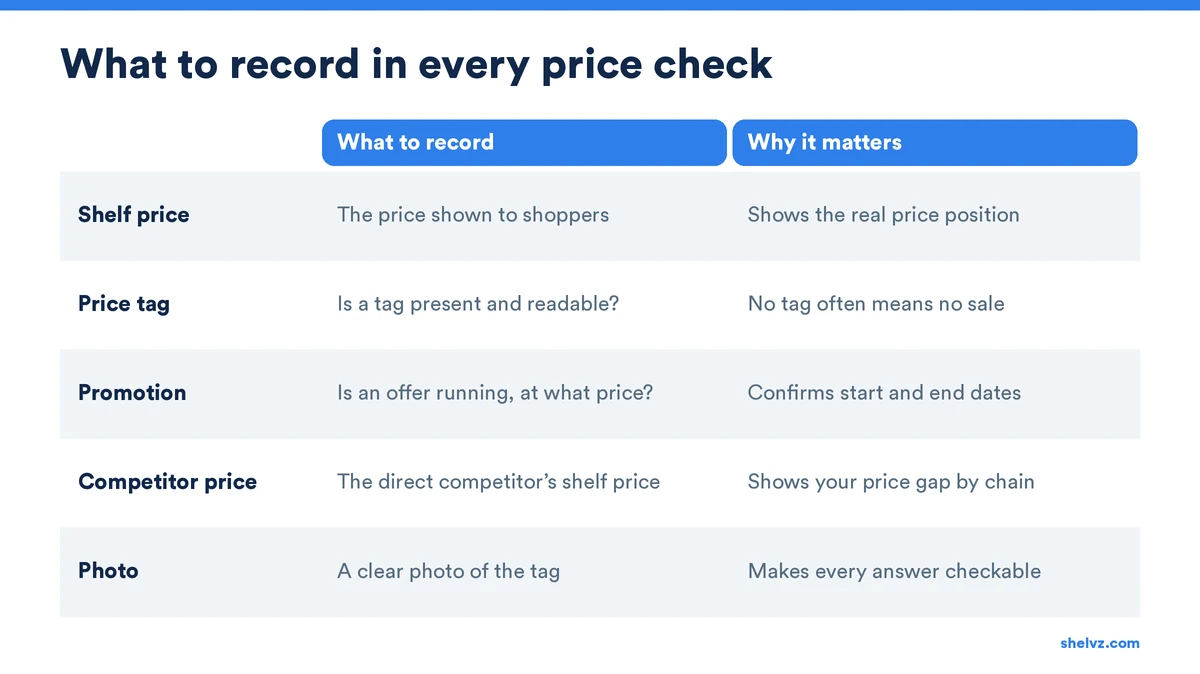
Keep the scope focused. Checking every product in every store is rarely worth the effort.
Start with your best sellers and the products where price matters most to shoppers. Add the direct competitor product for each one.
Cover your key accounts and a sample of other stores in each region and channel. Include both modern trade and traditional trade if you sell in both.
For each product, record:
Most brands already have people visiting stores. Price checks work best as part of those regular visits, not as a separate project.
Our guide on field data collection covers how to design simple, reliable field forms.
Like what you’re reading?
Take a moment to subscribe before continuing and never miss out on exclusive insights, news, and case studies.
Price data only creates value when someone acts on it.
If a store shows the wrong price or no tag, the rep can often fix it on the spot. Bigger issues go to the key account manager.
Confirm that promotional prices start and end on time. This protects your margin and your price position. See our guide on promotion compliance audits for more.
Track competitor prices over time. A sudden drop in one chain may signal a promotion or a new price strategy. Our article on monitoring competitor activities explains how to build this into your routine.
Over time, price data shows how your price gap to competitors changes by chain and region. This helps commercial teams make better decisions, together with sales data.
Price monitoring looks different in each channel.
In modern trade, such as hypermarkets and supermarket chains, prices are set centrally by the retailer. A wrong price usually affects every branch of the chain. One correct report to the key account team can fix many stores at once. Here, the focus is on promotion timing, label accuracy and competitor prices.
In traditional trade, such as groceries and small shops, the owner often sets the price. Prices can differ from one street to the next, and many products have no price tag at all. Here, the focus is on how far prices are from the recommended price, and on whether distributors sell to stores at the agreed trade price.
Because of these differences, keep separate reports for each channel. Mixing them makes averages that do not describe either channel well.
With Shelvz, field teams record your prices and competitor prices with photos during regular visits, and managers see price gaps by store and region. Explore Shelvz market research or book a demo.
| Column | What it shows |
|---|---|
| Store and chain | Where the price was found |
| Product | Your product or competitor product |
| Shelf price | The price shown to shoppers |
| Recommended price | Your target price |
| Gap | Difference between shelf and recommended price |
| Promotion | Whether a promotion is running |
| Photo | Proof of the price tag |
Sort by the largest gaps first. This keeps the team focused on the issues that matter most.
Check key accounts weekly and other stores monthly. Increase the frequency during major promotions and when competitors change prices.
Yes. Your price only makes sense next to the products shoppers compare it with. Track the direct competitor for each key product.
Collection in physical stores still needs a visit, but the process can be simplified. Mobile forms, photos and automatic reports remove most of the manual work.
To see how Shelvz helps teams track shelf prices in the field, book a demo.
